
Artwork Guidelines
How do I set up white ink on Pouches for foil and metallic effects?
White ink can only be applied on Custom Pouches with clear or metallic material.
On clear material, white ink can be selectively applied to create a clear window area. On metallic pouches, areas without white ink will reflect the material’s foil-like sheen—even areas with CMYK artwork on them!
How can I use white ink on my Pouch design?
On Pouches with clear material, white ink can be used to create a clear window area.
On Pouches with metallic material, areas without white ink will reflect the material’s foil-like sheen—even areas that have CMYK artwork on them!
How do I add white ink to my Pouch artwork?
Vector artwork is required for indicating white ink areas on Custom Pouches. To add white ink to your art file:
- Create the whiteink spot color inside of your design application.
See detailed steps for creating this color in the next section. - Create vector shapes of any artwork you want to print or underprint in white ink, and assign the spotwhite color to them.
- Place all of the whiteink images on a separate layer that is positioned above the layer with your CMYK artwork.
How do I create the spotwhite swatch to add white ink to my Pouch artwork?
Creating artwork in the spotwhite color ensures we clearly know what you want printed as white ink. Here is how to create this color swatch in Illustrator:
- Open the Swatches palette (if needed) by clickingWindow > Swatches inside of Adobe Illustrator.
-
Click the fly-out menu in the upper right-hand corner of the Swatches palette and select Add New Swatch.
a. For the swatch options, set the following values:
Swatch name: whiteink
Color type: Spot Color
Color mode: CMYK
Color build for display: 20c, 0m, 0y, 0kb. It's very important that the settings are correct for this color. Double-check against this screenshot:
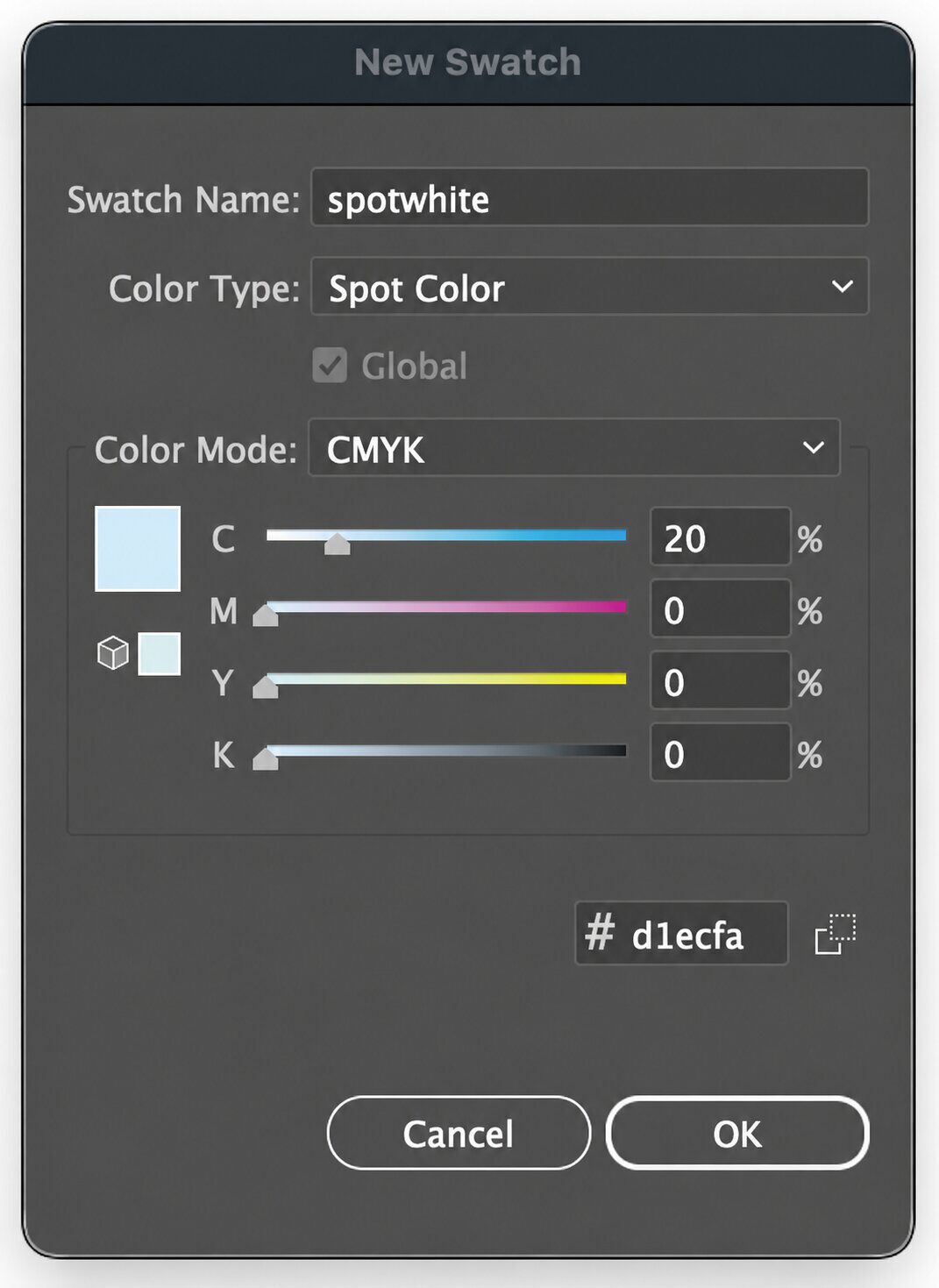
How do I create a clear window on Pouches?
On Pouches with clear material, white ink can be used to create a clear window area. To do this:
- Create a vector rectangle that covers the artboard; put the shape on its own layer named White Ink.
- Apply the spotwhite swatch color as a fill to the rectangle.
- Create the vector shape of your window.
- Set the window shape’s fill color to white (0c, 0m, 0y, 0k).
- Place the window shape at the top of the White Ink layer. If you’re feeling extra skilled, Exclude the window shape so that it punches through the whiteink shape.
Helpful tip: Setting all whiteink shapes to Overprint and turning on Overprint Preview in Illustrator allows you to visualize where the white ink will print underneath your CMYK artwork.
How do I design artwork on metallic Pouches?
On Pouches with metallic material, areas without white ink will reflect the material’s foil-like sheen—even areas that have CMYK artwork on them. There are two strategies to masking out the artwork to show us how you want it to print.
To indicate areas where you do not want the metallic sheen:
- Create vector shapes of each area that you do not want to show as metallic; put the shapes on a dedicated layer named White Ink.
- Apply the spotwhite swatch color as a fill to each shape as you create them.
- If you’re feeling extra skilled, Unite all of the white ink shapes so they are a single, combined shape.
To indicate areas where you do want the metallic sheen:
- Create a vector rectangle that covers the artboard; put the shape on its own layer named White Ink.
- Apply the spotwhite swatch color to the rectangle as a fill.
- Create vector shapes of each area that you want to show as shiny/metallic.
- Set each shape’s fill color to white (0c, 0m, 0y, 0k).
- Place the white shape at the top of the White Ink layer. If you’re feeling extra skilled, Exclude the window shapes one at a time so that they punch through the whiteink shape.
Helpful tip: Setting all whiteink shapes to Overprint and turning on Overprint Preview in Illustrator can help you to visualize where white ink will print under your CMYK artwork.
What other Artwork Guidelines apply to Pouches?
Pouches follow similar requirements as our other products that print in CMYK. To read our complete artwork recommendations, see Setting up artwork for digital printing.